


3. Phasing and planning
Overseeing a project from start to finish in one go is almost impossible. By breaking it up you gain control: you see what has to happen when, who is responsible for what, and at which moments someone has to decide. This chapter is about that breaking up, first into phases and then into work packages and a schedule.
After this chapter:
- You understand why phasing is essential to keeping a project under control.
- You recognise the six phases and know what each phase delivers.
- You know what decision points are and why you build them in between the phases.
- You can break the work down into work packages using a Work Breakdown Structure.
- You know what a Gantt chart, the critical path and a milestone are.
- You can build up a deadline you can deliver on, and monitor it before it falls.
Why phasing works
A project rarely runs in a straight line from idea to delivery. There are moments in between at which you look back, adjust or decide to stop. Phasing makes those moments visible rather than accidental.
Think of the process as a funnel. At the start all options are still open and you invest little. As you progress the direction becomes more concrete and it becomes more expensive to make major changes of course. That is why every transition calls for a conscious decision: do we carry on, adjust or stop? That decision is called a go or no-go, and you take it together with the client. Those intermediate stops sometimes feel like delays, but they prevent you from working for months on something that stopped fitting long ago.
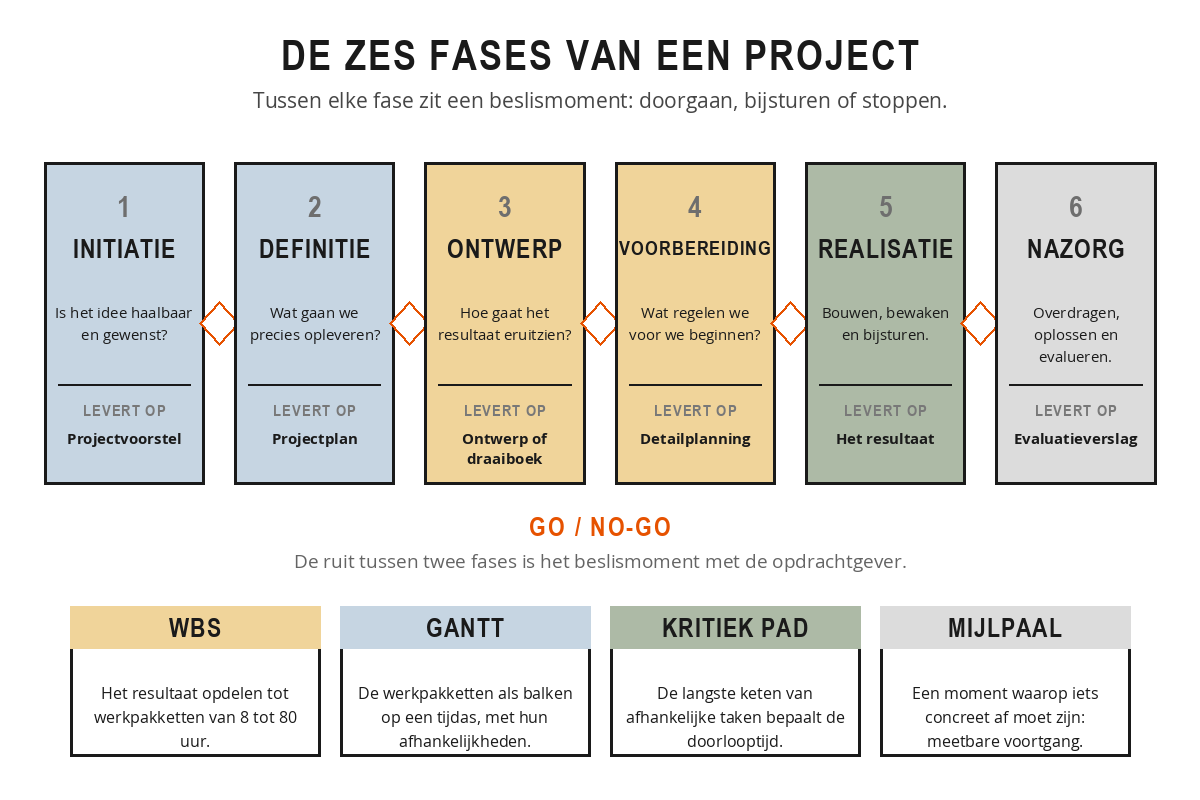
The six phases and what they deliver
1. Initiation. You explore the idea. Someone identifies a problem or an opportunity and proposes turning it into a project. You investigate whether it is feasible, whether there is support for it and whether it fits with where the organisation is heading. This phase produces a project proposal: often no more than two sides of A4 with the rationale, a rough estimate of time and costs and the name of a possible project manager.
2. Definition. If the proposal is given the green light, you sharpen up what exactly needs to happen. Objective, result, scope, preconditions and requirements are put on paper, as in chapter 2. This phase produces the project plan.
3. Design. You work out what the end result will look like: a construction drawing, a functional design, a running order for an event. The phase ends with approved designs, and from that moment on everyone knows what is going to be built or organised.
4. Preparation. You arrange everything needed to be able to start: purchasing materials, contracting suppliers, reserving people, applying for permits, drawing up the detailed planning. This phase is the one most often underestimated, while it is precisely here that a lot of delay arises.
5. Realisation. The real work. Things are built, implemented or carried out. For you this is the phase of monitoring and steering: tracking progress, clearing bottlenecks, communicating with your client. The phase ends with delivery.
6. Aftercare. You hand over the result, resolve teething problems and evaluate. What went well, what could be better, what will you take with you? This phase is often skipped, and that is a shame, because this is where the learning gains for the next project lie.
Put the decision points straight into your client's diary, with a date, at the moment you draw up the phasing. A go/no-go that you only schedule when the phase is almost over becomes a formality in practice: by then everyone has already moved on.
Work packages and the WBS
Before you start planning, you break the project into manageable pieces. You do this with a Work Breakdown Structure, a division of the project result into sub-results and ultimately into work packages. A work package is a unit of work that you can give to one person or team, with a clear beginning, end and result.
Note the word result. You break the work down by what has to be delivered, not by who does what. If you are organising a conference, you split it into venue, speakers, communication and logistics. Communication then covers work packages such as building the website, sending out invitations and the social media campaign.
A good work package meets the 8/80 rule: it takes a minimum of 8 hours and a maximum of 80 hours. Any smaller and it becomes micromanagement; any larger and you lose the overview.
The Gantt chart
Once you have your work packages in view, you place them in time. The Gantt chart is the most widely used tool for this: tasks as horizontal bars on a time axis, with who is responsible and how tasks connect. Its strength is that you can see at a glance when something has to start, how long it takes and what runs in parallel. Arrows between the bars make dependencies visible, for example that the caterer can only be booked once the venue is fixed.
The critical path and the milestones
Not every task is equally time-critical. Some tasks have float: you can start them a few days later without the end of the project shifting. Others are on the critical path, the longest chain of dependent tasks that together determine the lead time. A delay on the critical path is a delay to the whole project; a delay outside it can usually be absorbed. Knowing which tasks are on that path is the difference between steering and pushing everywhere at once.
Milestones are the anchor points in your schedule: moments at which something specific has to be finished. A signed contract, an approved design, a delivered test version. They take no time themselves, but they make progress measurable, and that is exactly what you use them for.
In the refurbishment of an office building the critical path runs via demolition work, then the pipework, then the walls, then the finishing. Selecting the paint colours can run in parallel and has three weeks of float. If the demolition work overruns by three days, delivery shifts by three days too, because everything behind it is waiting. If selecting the paint overruns by a week, nobody notices. The project manager therefore spent his Monday morning with the demolition contractor and not with the colour chart, and for the first few weeks that felt like the wrong priorities to an impatient Facilities department.
Scheduling people and resources
Besides time, you also plan people. Someone cannot be fully available for five work packages at once, and project members usually have their regular jobs alongside. A resource plan makes visible who has how many hours available and when, and where you will get overloading. Without that overview you produce a plan that only works if nobody is ever ill, goes on holiday or works on anything else.
Deadlines you can meet
A deadline you agree off the cuff to keep the client happy is one you will not meet. A realistic deadline is built up from the planning: you add up the lead times along the critical path, add a margin for the unforeseen, and arrive at a date you can explain. Ten to twenty per cent margin is common, and on a project with many unknowns it may be more.
Do not negotiate about the end date, but about scope, quality or resources. If the client wants to be finished two weeks earlier, ask which sub-results may be dropped or what extra capacity will become available. That way the triangle from chapter 1 stays visible, instead of you being landed with the bill.
Monitoring is not something you do on the day itself. You work with interim milestones and short progress reviews, so that you spot delays early. The sooner you identify a looming overrun, the more room you have to choose. If a deadline does come under threat, you have four options: deploy more people, reduce the scope, adjust the quality or move the date. Which one you choose is something you discuss with your client. What you never do is hope that it will sort itself out. Delay is no disgrace; concealed delay is.
A local authority is implementing a new case management system, with go-live planned for 1 May. In February, the project manager sees that the data migration package, which is on the critical path, is eleven days behind against a margin of ten days. She reports it that same week, with three options: hiring an external migration specialist for 18,000 euros, migrating two of the seven case types in June instead, or moving go-live to 1 July. The steering group opted for the two case types later, because the date was tied to a statutory obligation. That decision took ten minutes. Had she reported it in April, only the most expensive option would have been left.
Take your own project.
- Which of the six phases is it in now? And what was delivered in the previous phase?
- Break the result down into a maximum of eight work packages of 8 to 80 hours. Give each package one owner.
- Which packages depend on each other? Draw the chain and see which one is the longest: that is your critical path.
- Name three milestones with a date.
- How much margin is there in your schedule? And where is that margin: at the end, or spread across the work packages?
Summary
- Phasing makes visible the moments at which you look back and decide. Between each phase there is a go/no-go with the client.
- The six phases are initiation, definition, design, preparation, realisation and aftercare. They deliver, in that order, a project proposal, a project plan, an approved design, a detailed schedule, the result and an evaluation report.
- With a Work Breakdown Structure you break the result down into work packages of 8 to 80 hours, divided by result and not by person.
- A Gantt chart plots the work packages as bars on a timeline, with their dependencies.
- The critical path is the longest chain of dependent tasks. Delay on that path delays the whole project; outside it there is float.
- Milestones take no time but make progress measurable.
- A realistic deadline is built up from the critical path plus ten to twenty per cent margin.
- If a deadline comes under threat, you choose from four options: people, scope, quality or date. Always together with the client, and always as early as possible.
A task in your schedule has five days of float and is therefore not on the critical path. That task overruns by three days. What does that mean for the end date?
What is the purpose of the decision point between two phases?
Your client wants to bring delivery forward by two weeks. According to this chapter, what is the best response?