11. Uploading the website
Making a website is fun, but if the website is not online it has little effect. In this chapter we will therefore upload the website we have made. To be able to upload a website, you need a number of details from your hosting provider. (A hosting provider is a company that makes space on the internet available to its customers to place a website.) To gain access, as the administrator, to your hosting space, you need to have three things (FTP details). First of all, you have the server address then you also need a user name and finally an accompanying password. These details will be provided by your hosting provider. Besides the hosting space, you also need to have a domain name. That domain name can be registered with the same company that hosts your website, but it can also be a different company. The domain name will have to point to your hosting space. The actual transfer of the files from your computer to the server is done via FTP. FTP is a transport protocol (File Transfer Protocol).
11.1 Downloading an FTP program
There are various free FTP programs you can download. For both Windows and Apple you can use, for example, Cyberduck. Ultimately, it does not matter which FTP program you use.
After installing Cyberduck, you can connect to your web server by clicking the plus sign at the bottom left. This creates a new bookmark. In the dialogue box that opens, you can enter a name for the shortcut, followed by the server name and a user name (see image).
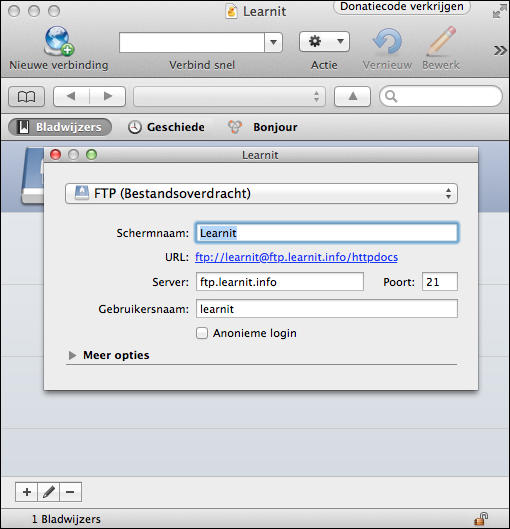
Once you have entered these details, you can close the dialogue box again. A bookmark has now been created which you can click to establish the connection. A pop-up window will then open in which you need to enter the password. Confirm the password and, if all has gone well, you will be logged in to the web server (see image).
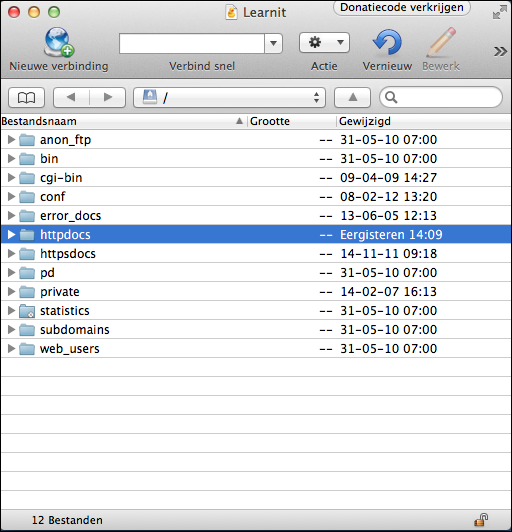
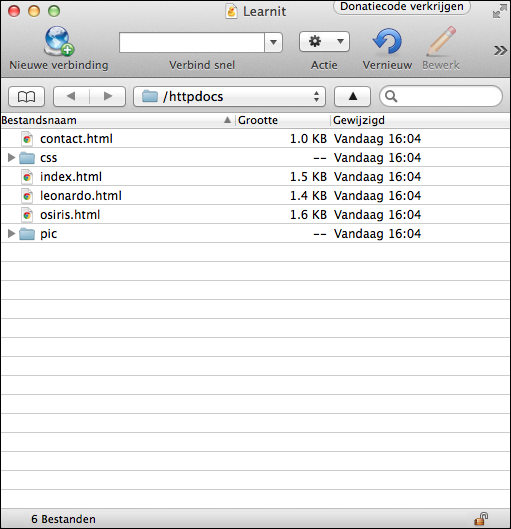
The screenshot above shows a number of folders on the server. These folders may not be on your server, as this can differ per hosting provider. In this case, the httpdocs folder is the one that matters. If there is an index.html in the httpdocs folder, it will be opened when a visitor wants to open your website. If you do not have an httpdocs folder, it is best to try it out to determine which folder is intended for the website. To place files on the server, you only need to drag the files from the website folder on your desktop to the remote server. The image below shows the end result on the server.
11.2 Viewing the end result in the browser
If all has gone well, you can now open a new browser and type your domain name into the address bar (see the image below).