


4. Making agreements with your team
The first three chapters were about you: which work you outsource, what you put into it, how you check what comes out. That is half of it. The other half is that your colleagues make the same choices, because it is your organisation that runs the risk and your client who receives the letter. This chapter is about how to move from loose, quiet use to a way of working that everyone knows.
After this chapter:
- You understand why banning AI produces the opposite result in practice.
- Can you map out what is already happening in your team.
- You know the six questions that together form a workable agreement.
- Do you know how to hold the conversation without it becoming about right and wrong.
- Can you write the agreement down in such a way that it is still usable a year from now.
AI is already being used
Most organisations think they are at the start of this issue. That is rarely the case. AI is already being used, on people's own initiative, usually with a free version and usually without anyone knowing. Not out of unwillingness: people solve a problem with whatever is to hand, as they always have done.
That brings two things with it. First, information is already going out and nobody knows which. Second, everything that goes well stays invisible, because someone doing it quietly does not share it either. The colleague who has found an excellent way to structure reports keeps it to themselves.
A ban solves neither. It moves use to the private phone, where you have no view of it at all. The alternative is not to ban or to allow, but to agree: stating what is permitted, where it stops, and what you do when you do not know.
A consultancy firm with 25 staff sent round an email in the spring saying that AI tools were not to be used until there was a policy. Six months later that policy still did not exist. A quick poll in the team meeting revealed that eleven of the twenty-five people were using an assistant every week, all of them a free version, and that three of them had pasted client documents into it. The ban had had one effect: nobody had ever asked a question about it. After that conversation, agreements were on paper within two weeks, with one approved tool and a clear boundary around client data.
Start by taking stock, not with rules
The temptation is to start with a list of what is forbidden. Do not do that. Start with the question of who uses what and for what. That conversation yields three things at once: you find out where the risks are, you collect colleagues' good discoveries, and you make the subject something to be discussed rather than something done in secret.
Do it without judgement. Anyone who gets rapped over the knuckles in that conversation because they pasted a quotation into a chat window last month will not mention it next time. It is not about what has happened, it is about what you do from now on.
Put the subject on the agenda of an ordinary team meeting once, instead of making a separate session of it. Half an hour is enough for taking stock. Ask everyone to bring one example of something that went well and one of something that disappointed. The second usually produces the best discussion.
The six questions
A usable agreement answers six questions. No more, because nobody reads a ten-page document, and no fewer, because then the most important uncertainty is left open.
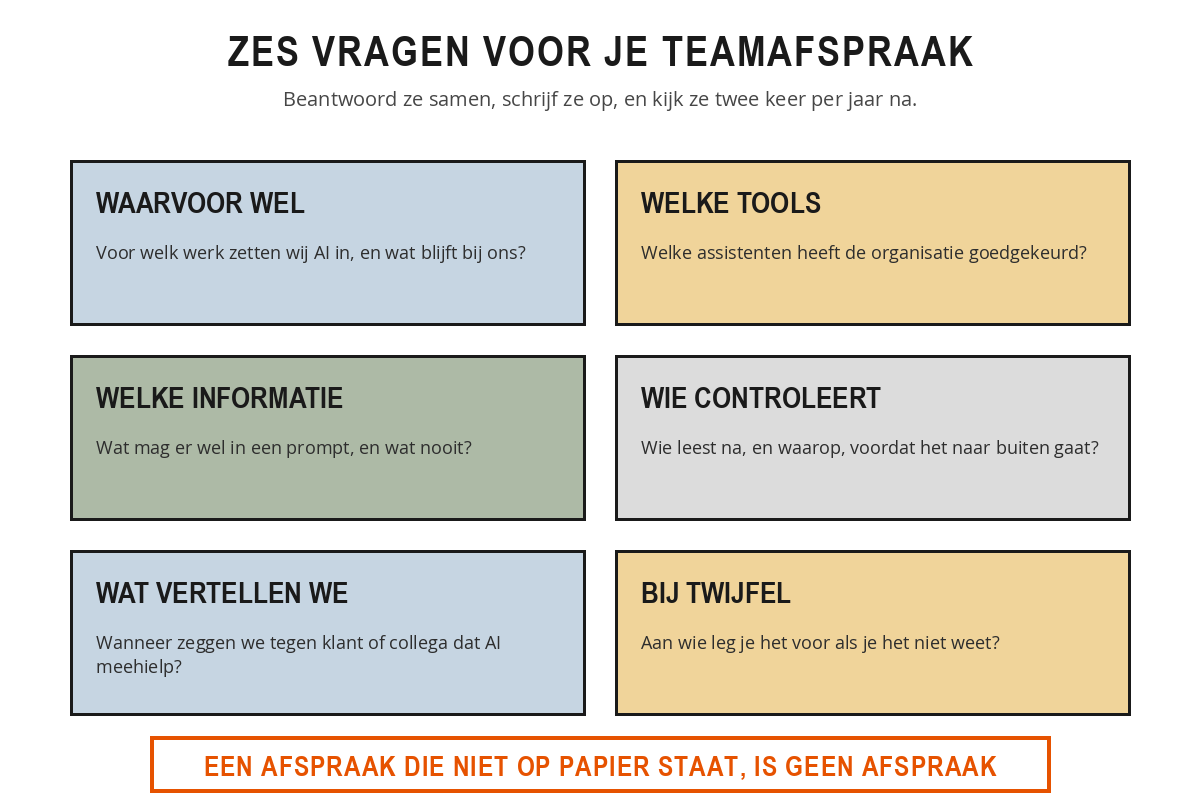
1. What for? What work do you use AI for, and what stays with people? Use the division from chapter 1: hand over the form work, keep the judgements yourself. Make it concrete for your own work. "Draft emails, summaries of reports and first outlines" is an agreement. "Sensible use" is not.
2. Which tools? Which assistants has the organisation approved, and which not? This is the only question whose answer may change within a year, so also note who decides on it and when it will be reviewed again. Above all, make sure there is at least one approved tool. Without an alternative, a ban is an invitation.
3. Which information? What may go into a prompt and what never may? Take the four types from chapter 2 here and translate them to your own documents. Name the documents: case files, quotations, HR matters, the client database. An example says more than a category.
4. Who checks? Who checks what, and on which points, before anything goes out? In most teams that is the person sending the document out under his name, and that is a perfectly good arrangement, provided it has been made explicit. For documents that go out externally or decide on money or people, a second pair of eyes is sensible.
5. What do we disclose? When do you tell a client or a colleague that AI helped out? Organisations differ on this, and that is fine, as long as you take one consistent line. A workable middle ground: internal drafts do not need it, texts intended as personal do, and anything that goes out as advice or research always does. What you certainly do not want is for a client to find out for themselves.
6. In case of doubt? Who do you put it to when you do not know? This is the question that is most often skipped and that yields the most. As long as there is no one to ask, everyone does whatever they come up with themselves when in doubt, and that is precisely the situation you set out to solve. Name a person, not a department.
At a care organisation, the operations manager put the six questions on a single A4 and discussed it in three team meetings. Question 5 produced the longest discussion. Part of the team felt that clients should know if a letter had been drafted with AI, another part found that excessive, since you do not say so for a standard letter from the system either. They settled on a boundary: letters about the care of a specific client are always written and checked by a person, and no notice is needed because there is no AI in them. For general information the assistant may help and nothing is stated. That one sentence removed the entire disagreement, because it was not about AI but about which kind of letter it is.
Write it down, and keep it short
An agreement that is not written down is one individual's habit. Within three months nobody remembers exactly what was agreed, and every new colleague starts again from scratch.
Keep it to one page, with the six questions as headings and two or three sentences under each. Put the date on it and the name of the person responsible. Add when you will review it; twice a year is enough. And put it somewhere people will come across it when they need it, not in a folder only the author knows about.
Avoid two things when writing it down. Do not mention version numbers or prices, because they date within six months and then the whole document looks out of date. And do not write a rule you cannot explain to someone starting tomorrow. If you cannot explain why something is not allowed, nobody will stick to it.
Create one place where colleagues share prompts that worked well. A shared document is enough. It is the cheapest way to raise the level of an entire team, and it turns using AI into something you talk about rather than something you only do.
Put the six questions on paper and answer them for your team, as you think things stand now.
- For each question, note whether the answer has actually been agreed, or whether you are filling it in as you think it is meant.
- Count how many of the six you have filled in yourself. That number is your starting point.
- Choose the question with the most uncertainty around it and consider who you would put it to.
- Ask one colleague to fill in the same thing and compare. Where you differ is where the conversation is needed.
Take the list you made in chapter 1. It gives you concrete examples from your own work straight away for question 1.
Summary
- AI is already being used in your organisation, usually quietly and usually with a free version.
- A ban moves the use to places you can no longer see, and keeps the good discoveries invisible.
- Start by taking stock without judgement, not with a list of what is forbidden.
- Question 1: what do you use AI for, and what remains human work?
- Question 2: which tools are approved, who is responsible for them, and when will that be reviewed?
- Question 3: which information may go in and which never may, using your own documents as examples.
- Question 4: who reads things over before they go out, and what do they look for?
- Question 5: when do you say that AI helped?
- Question 6: who do you go to in case of doubt? Name a person, not a department.
- Put it on one page, with a date and an owner, and review it twice a year.
Why does a ban on AI tools usually have the opposite effect in practice?
According to this chapter, where do you start if you want to make agreements with your team?
Which of the six questions is most often skipped, even though it prevents everyone from working it out for themselves?
Ready for the next step?
You have completed the free starter of AI in the workplace. The next chapter in the full course is Smart prompting: How a good instruction is put together, techniques that improve the answer and the mistakes everyone makes.
Take the 1-day training course →From €675,- excl. VAT · with an experienced trainer included