


3. Figures and charts that land
Figures only convince once the eye finds them straight away. A few design choices determine whether your reader notices the deviation within two seconds or only after you have pointed it out. This chapter is not about prettier pictures, but about the shortest route from a figure to a conclusion.
After this chapter:
- You can name the four visual features your reader notices without having to look for them.
- Use colour as a carrier of meaning rather than as decoration.
- You make a reasoned choice between a table, a chart and a single sentence with the figure in it.
- You know the five rules for a chart in a report and the forms you avoid.
- You recognise a misleading axis scale and know when zooming in is acceptable.
What the eye sees before it looks
Your brain processes part of what you see before your conscious attention gets involved: within about a quarter of a second, without you thinking about it. A red dot among twenty black dots leaps out without you having to go through the dots one by one. If there are twenty black dots and one of them is the letter O, you have to scan. The first costs you nothing, the second costs you attention.
For your report this means the following: every difference you fail to make visible in that first second, you pass on to your reader's working memory. And he needs that working memory for the content. Four features work best in a financial report. Colour is the strongest: the reader spots a single red figure in a grey table immediately. Size says important: you use large type for the five to eight key figures in your key figures block, nowhere else. Position and alignment make an exception visible: a line that is indented or stands apart reads as deviating from the series above it. And orientation, an arrow up or down next to a percentage, gives direction without costing an extra column.
The rule behind all four is the same: they only work as exceptions. Mark your ten deviations in red and red becomes the new default colour, after which nothing stands out any more.
Colour with one fixed meaning
Colour as a carrier of meaning means that every colour in your report has an agreed substantive meaning, and that this meaning stays the same every period. Colour is then not formatting but shorthand: the reader sees red and knows without reading that a decision is needed here. As soon as the same colour means "deviation" one month and "branch North" the next, the shorthand is worthless.
A workable palette consists of a neutral base and at most three signal colours. Grey or black is the base: everything that is simply in order appears in it. Red means that the value falls outside the agreed range and that a decision is being asked for at this meeting. Orange means that the value is still within the acceptable range, but that the direction is unfavourable. Grey means: within the norm, no attention needed. Preferably leave green out; it adds no decision and it competes with red for attention. Every colour you add costs your reader a trip to the legend before they get to the figures.
Test your use of colour by viewing the page in greyscale. If your message disappears, the colour is carrying it on its own. Roughly one in twelve men has difficulty telling red and green apart, so always pair a colour signal with a second feature: an arrow, a figure in bold or a symbol.
Three mistakes keep coming back. Colour as a department code, where every branch gets its own shade and the status colour drowns. The coloured header row that shouts just as loudly as the figure below it. And the colour that changes meaning from one period to the next, usually because someone else has updated the file. So record the agreement with your definitions at the back, together with the ranges. Then the meaning stays in place, even if you are not the one compiling the report on a given occasion.
Table, chart or just a sentence
The choice between a table and a chart is not a matter of taste but a question of reading. A table is precise: the reader checks the total, reads off an exact amount and compares line by line. A chart is quick: the reader sees a direction, a peak or a ratio without having to remember a single figure. And sometimes the third option is the best, namely one sentence with the figure in it, right in the middle of the commentary.
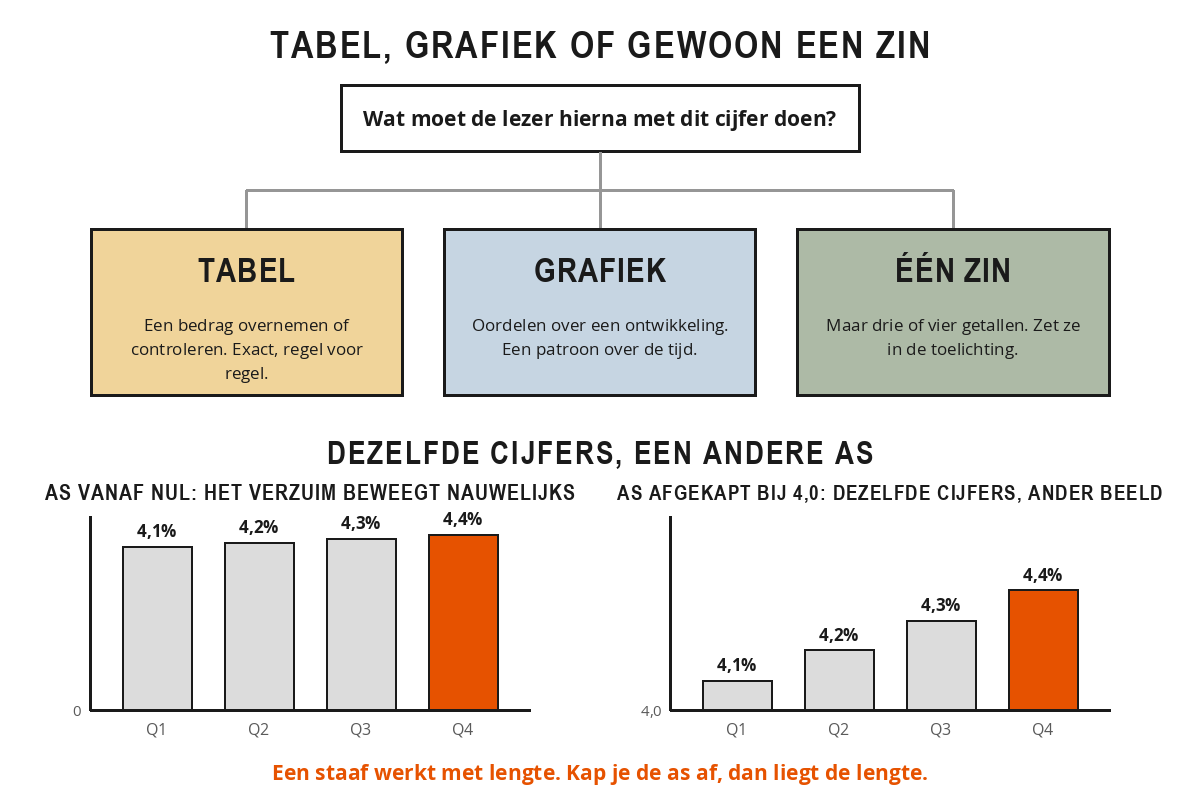
Putting three or four figures into a chart always costs too much ink for too little information; you write those down in a sentence. Twelve months of revenue alongside the budget, on the other hand, call for a line, because the pattern is the story and not the individual monthly values. If you are in doubt, ask yourself what the reader has to do next. If they have to copy or check an amount, it becomes a table. If they have to judge whether a development is acceptable, it becomes a chart.
Five rules apply to every chart you include. The title is the conclusion: above the chart it does not say "Revenue per month", but "Revenue has been behind budget for four months". Sort by value, not alphabetically: in a comparison between departments or product groups the largest goes at the top, because the ranking is usually the message. The benchmark is in the chart: a thin dotted line at budget level makes the deviation visible without the reader having to do any arithmetic. Labels next to the line, at the end of it, because a legend in the corner forces the reader to look back and forth between colour and meaning. And a maximum of four series: with more than that the lines cross each other so often that the trend disappears. Whatever is left goes in the appendix.
Ilse's report contained a bar chart showing the margin per branch, sorted alphabetically, in four cheerful colours, with the legend in the bottom right. It took the same two minutes of explanation in every meeting.
The new version is a bar chart in grey, sorted from high to low, with the branch name next to each bar and a dotted line at the standard of 33 per cent. Only the bar for the South branch is red, because it is the only one that dips below it. Above the chart it says: "Only South stays below the margin standard, the other three meet it." No legend is needed any more, and no explanation either.
Four forms you keep out of a report. The pie chart with more than three slices, because people compare angles badly and lengths well; with seven slices all you see is that there are seven things. The 3D effect, because depth distorts the length of the bar at the front, and then you are measuring perspective instead of euros. The dual y-axis, because with two scales in one chart area you decide for yourself where the lines cross, and that intersection suggests a relationship that need not exist. And decoration without a function: gradients, shadows, thick borders and gridlines every ten units. Any element you can remove without losing information did not belong there.
The axis that misleads your reader
A misleading axis scale is an axis whose starting point, intervals or direction have been chosen in such a way that the visual impression is stronger or weaker than the figure warrants. The numbers are correct, the reader's conclusion is not. Usually it is not deliberate, but simply your program's default setting.
The truncated axis is the best-known form. A bar works with length: the length is the value. Truncate the axis and the length lies. That is why a bar chart always starts at zero. A line chart may zoom in, because there it is the direction that matters, but then you state the starting point of the axis clearly. Three other interventions do the same work. Unequal intervals on the time axis, for example four months, then a quarter, then a year, smooth out an erratic series. A scale that shifts from period to period makes a figure that stays the same look different every month. And a reversed axis, on which a rising absence rate runs downwards, turns the reader's judgement on its head.
Absenteeism rose from 4.1 to 4.4 per cent over one quarter. In the chart that went to the management team, the vertical axis started at 4.0 per cent. As a result, the December bar was four times as tall as the October one, and absenteeism became the main item on the agenda for half an hour.
The same figures with an axis starting at zero show a line that barely moves. The right message was: absence is rising slightly, and we have not met the norm of 4.0 per cent for three quarters. That is a different conversation, and it is about the norm rather than about the last month.
Set the scale of your standard charts once in your template and leave it there, even if this quarter's values stay within a narrower range. A chart that is scaled differently every period cannot be compared with last month's.
Take one page of figures from your last report.
- Count the number of different colours on that page, including frame lines and shading, and write down in one sentence what each colour means. If you can't, mark it with a cross.
- Look at the page for three seconds and note down which figure your eye picked up first. Is that also the figure that matters most in substance?
- Pick a table and a chart and write down for each of them which question of the reader it answers. If a different form emerges, change it.
- Check where the axis starts on every bar chart.
On that basis, create a palette of no more than three colours, with one line of meaning per colour, and add it to your definitions.
Summary
- Your reader sees colour, size, position and orientation without having to look for them, but only if you use them sparingly.
- Red means a decision is being asked for, orange an unfavourable direction, grey within the norm. Green you leave out.
- Always combine a colour signal with a second feature, because not everyone sees colour equally well.
- A table is for exact amounts, a chart for a pattern, and three or four figures you write down in a sentence.
- Five rules for every chart: the title is the conclusion, sort by value, include the benchmark, label at the line, no more than four series.
- Again, avoid the pie chart with more than three slices, the 3D effect, the dual y-axis and decoration without a function.
- A bar chart starts at zero; a line chart may zoom in provided you state the starting point.
In your key figures block you mark every item that deviates from budget in red. What is the objection to that?
You want to show how revenue compares with the budget over twelve months. Which form does this chapter choose?
Why, according to this chapter, does a bar chart always start at zero?