


2. The basic structure
2.1 Getting started with coding
The image below shows the basic structure that applies to every website. You can simply copy this code to start your website with. The code begins with a so-called html opening tag and finally closes with the html closing tag. A tag is best thought of as a label, and anything written as a tag in the HTML code will not be visible to the visitors of your website. The html closing tag is recognisable by the slash ('/') it contains, and in this way the opening and closing tags form a so-called HTML container. The website should be located entirely within the HTML container.
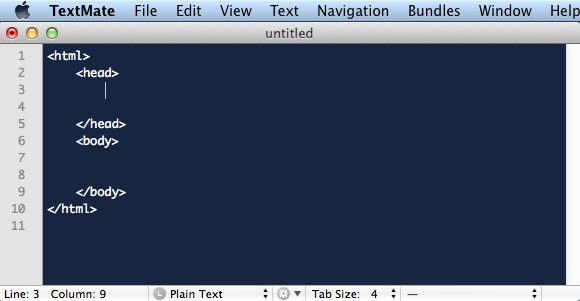
Within the HTML container there are two other containers. First we see the head container, followed by the body container. The contents of the head container are not shown on the website. Among other things, the head is used to describe the website, which is of interest to search engines. The body container, on the other hand, is the visible part of the website. This is where the content of the website, such as paragraphs, images and other media, is displayed.
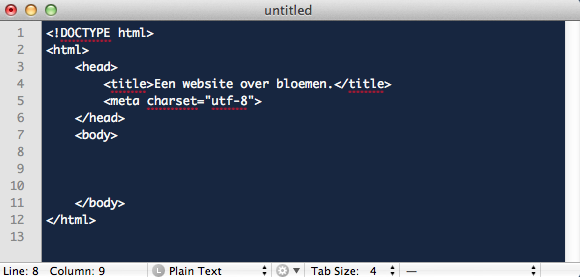
To complete the basic structure, it is also necessary to define the HTML version used. During this course we will be working with HTML5, and we can indicate this by placing <!DOCTYPE html> directly above the HTML container. Besides this addition, a few more additions are needed to complete the basic structure.
First of all, it is advisable to place a title container in the head of the website.
<title>A website about flowers.</title> (note the English spelling). It is an important container because it indicates what the website is about. Google, among others, attaches quite a lot of value to the content of this container, so do not forget it.
Next, you need to indicate which characters are used on the website. By using the code <meta charset="utf-8"> in the head of the website indicates that you only use characters that belong to the utf-8 set. This set includes, among other things, the Latin alphabet.
Ultimately, the HTML code looks like the image below:
2.2 Saving
Now that a start has been made, it does no harm to save the website (the text file containing the code) under the name index.html. It is handy to place a folder on the desktop in which all the parts of the website are stored. (Think, for example, of all the html, jpg, pdf and mp3 files.) You may choose the name of the folder yourself. When you eventually upload the contents of the folder to the internet, the complete website will be online.
Finally, it is important to know that the first page of a website (the homepage) always has the name index.html has. You may choose the names of all the other pages of your website yourself.