


8. Enhancing navigation with CSS
At the moment there are a number of links in a list at the top of our page. In front of the list are bullets and the items are listed one below the other. For our navigation menu, a different layout is desired. Add the code below beneath the last line of your CSS file and look at the result.
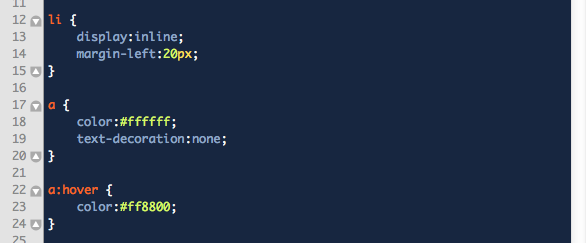
- When display:inline; is specified for an li in the stylesheet, this ensures that the bullet list is not displayed one item below the other but side by side. The bullets also disappear.
- The margin-left:20px; ensures that the items are not placed directly against one another, but that the links now keep a distance of 20 pixels.
- The colour specified for the a selector (applies to all anchors/links) makes all anchors/links white.
- For the same a selector, a text-decoration property has also been specified, which ensures that the standard underline beneath each link disappears.
- Finally, an a:hover selector has been added which ensures that when a visitor moves the mouse over the link, the link takes on a different colour (orange in this case).