


3. A group with mixed levels
You have invited twelve people to the same explanation, and after ten minutes you know that you actually have three groups in front of you. Two people have finished the exercise and are already clicking through screens you haven't shown yet. Seven are following along nicely. And at the back sits someone with their hands in their lap who hasn't touched anything. They all received the same invitation, but they don't have the same question. This chapter is about what you do with that difference, while you are only one person.
After this chapter:
- You recognise cold feet from behaviour in the first fifteen minutes, and you know what lies behind it.
- You apply four measures that lower the barrier at the keyboard.
- For each topic you decide on which of the four steps to self-reliance the participant should end.
- Use a fixed route for questions about help, so that you are not the only answer.
- You give both the front-runner and the straggler something to do in the same room.
Where the difference in level comes from
The differences within your group rarely come down to clever or slow. They come down to three things. The first is prior knowledge: anyone who has worked with a comparable package for three years will recognise half of your screens. The second is the route by which someone takes in information. One person only understands a permissions model once he sees it as a diagram, another only once he is allowed to explain it to someone, and a third only once he has clicked through it himself. The third is confidence: does someone dare to press a button without knowing what will happen?
Of those three, the entry point is the easiest to cater for, and it costs you almost no time. You don't have to produce three versions of your explanation. You take one topic and address several entry points with it in a short space of time: you draw it on the flip chart, you say in two sentences why it works that way, everyone clicks through it once themselves, and in pairs they explain to each other why their colleague was denied access. Four entry points, one topic, a quarter of an hour. Most technical trainers are themselves strong on reasoning and words, and as a result unconsciously train the way they learn: explaining how the system fits together, with plenty of language and little imagery or hands-on work.
Cold feet behind the keyboard
Cold feet is the hesitation of someone who wants to but does not dare. He does not doubt the usefulness of the system, he doubts himself. He is afraid that he will break something, that he is the only one who does not understand it, or that his clumsiness will be visible to the rest. That is something other than objecting to the new software; the latter is resistance, and that calls for a different conversation.
The fear is rarely put into words. You see it in behaviour, usually within the first quarter of an hour. The participant keeps his hands off the keyboard and looks at the person next to him. At every step he asks whether it's "all right like this" before pressing Enter. He writes everything down literally, including mouse clicks, and then daren't deviate from his own notes. He laughs off his uncertainty with "I'm not really a computer person". And the most important signal of all: he clicks away an error message without reading it. Anyone who doesn't read error messages has learned that an error message is a reproach rather than information.
Behind that fear there is almost always an earlier experience. A system that froze after a wrong click, a colleague who sighed, a helpdesk that asked whether he had tried restarting it. Add to that visibility: someone who makes a spelling mistake in a report does so in silence, someone who picks the wrong button in a course does so with a projector on and seven people around them.
Four measures lower that barrier, and together they take less than ten minutes. To begin with, you make it explicit that the environment is safe make it clear out loud that the environment is safe: this is a test environment, nothing real happens, and this evening you'll reset everything. After the first error message in the group, you repeat it. Next you you make a mistake yourself: you deliberately take a wrong route, show what the system then does, read out the message and translate it into plain language. That turns the error message from a punishment into a pointer. After that you have them start in pairs, two people behind one screen, one with the mouse and one looking on, and after a round you swap. And you ensure a a win within five minutes: you start with an action that is bound to succeed and that he immediately recognises from his own work. One success early in the morning does more for confidence than a compliment afterwards.
In a course on a new time registration package, Ton, a mechanic, is sitting at the back. He touches nothing all morning and only takes notes. In the second block the trainer demonstrates how to undo an incorrectly entered line with one click, and repeats this three times at three different moments. Just before lunch Ton starts typing. His first question is: "So if I do this wrong, I can just remove it?" That was the whole blockage. By the end of the afternoon he is the only one in the group to have submitted his weekly timesheet as well.
Four steps to self-reliance
Self-reliance is your participant's ability to get further on their own after the course: to look up an action, read an error message, ask the right question of the right person. That is a different aim from transferring knowledge, and it requires you to do less as you go along rather than more.
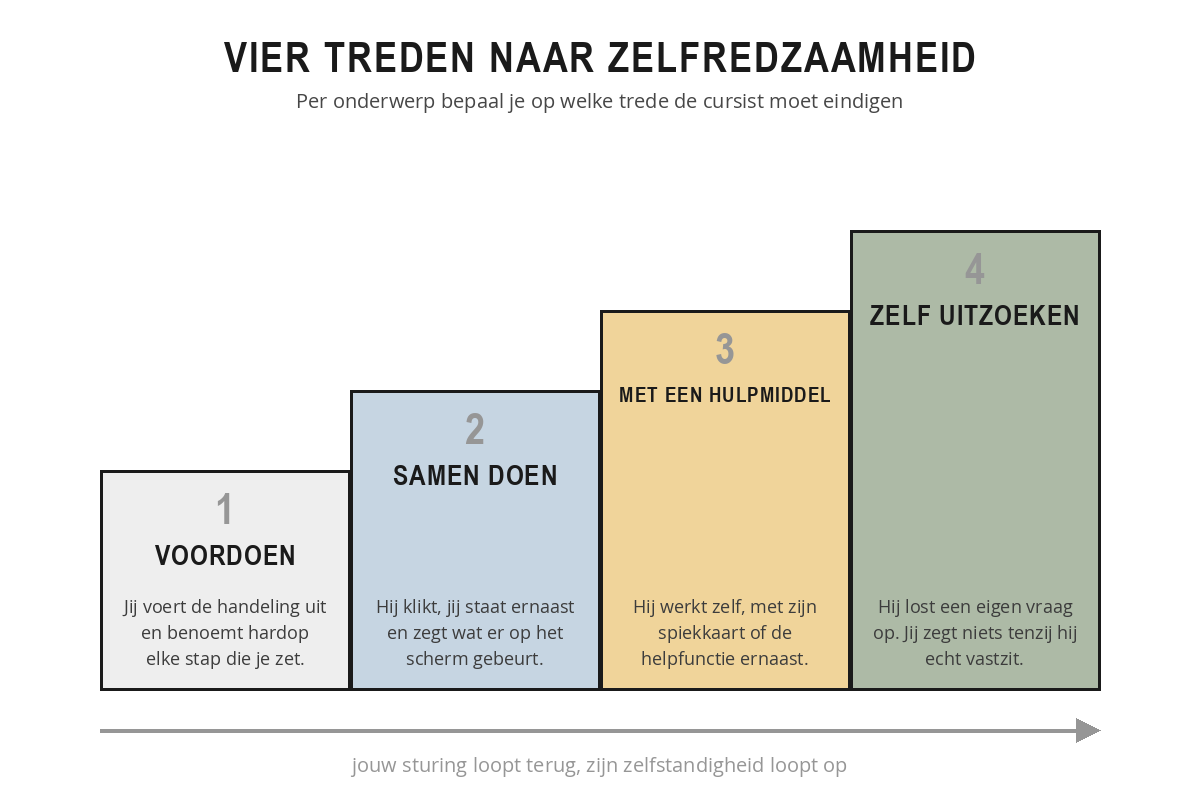
At step 1, demonstrating, you carry out the action and say out loud every step you take. At step 2, doing it together, he clicks while you stand beside him, and you say what's happening on screen. At step 3, with an aid, he works on his own, with his crib sheet or the help function beside him. At step 4, figuring it out themselves, he solves a question of his own and you say nothing unless he is genuinely stuck. From left to right, your steering decreases and his independence increases.
You work through the steps per topic, not per course. For an action someone performs daily, you want to finish at step four. For an exception that comes up twice a year, step three is enough: then he only needs to know where to find it. Making that choice in advance saves you time, because you don't have to cover everything in the same depth.
Questions need a fixed route, otherwise the group will learn within an hour that you are the answer. You agree at the start: first look it up yourself in the help function, the crib sheet or your notes, then the person next to you, then the trainer. You refer back to that consistently all day. And as soon as you move towards step four, your answer changes too: instead of the solution you give the search route. "Where would you expect to find this in the menu?" or "What exactly does that message say?" The first time that costs you a minute extra; the fifth time it costs nothing at all.
The front-runner and the straggler
Two types determine how busy you'll be in a mixed group. The front-runner has finished while the rest are still getting started, and goes off exploring out of boredom. Ignore him and within ten minutes he'll be in screens you haven't reached yet, with a question that pulls the whole group out of the programme. So you keep an extension objective in reserve, something like "see whether you can also set this up for a whole department at once". Or you ask him to take his neighbour along. That last one isn't a way of keeping him quiet: explaining sits on the bottom layer of the learning pyramid, so it's the most instructive task of the afternoon for him.
The straggler is the opposite: he falls behind and doesn't say so. You see it on his screen, not from his hand, so you have to walk around to notice it. The biggest mistake you can make at that point is to take over the mouse. That fixes the screen and nothing else; he still hasn't performed the action himself, and now he also knows he needed help. What does work is having him do the step again while you say out loud what is happening. That takes thirty seconds longer and does actually give him something.
You don't need to diagnose anyone. In the first quarter of an hour, look at behaviour: who reaches straight for the mouse, who leans back and watches, who turns to the person next to him, who writes everything down, who keeps his hands still. Within ten minutes you have a workable picture of your group, and you know who you'll go to first during the opening exercise.
Karin is running a day on a new reporting package for nine colleagues. Two of them have been building pivot tables for years, four only know the old screen, three are new. Beforehand she makes a choice per topic: filtering and exporting have to reach step four, building your own report step three, and the administration settings stay at step one, demonstration. For the first exercise she pairs the two experienced colleagues with the three new people. By half past ten the first group has finished; they are given the task of working out how to have a report sent automatically every Monday, and showing that to the rest at the end of the day. In this way Karin keeps nine people occupied without having to split herself in two.
Take the group from your next session, with their names if you have them.
- Choose three topics from your programme and decide for each topic which step the participant should end on, and how you get to that step.
- Write down two questions you would still answer yourself today, and formulate a search question back to the participant for each of them.
- Write down the first action you'll start with, and check that it is certain to work and is recognisable from their own work.
- Think of one extension objective that you keep in reserve for anyone who finishes early.
- Write down the sentence you'll use at the start to make clear that the environment is safe, and the moment at which you'll make a mistake yourself.
Summary
- The differences in your group lie in prior knowledge, in the entry point through which someone learns, and in the confidence to press something.
- You cater for several entry points with a single topic: drawing, explaining, clicking through it themselves, explaining it to each other.
- You can see cold feet in behaviour: hands still, asking for confirmation before every Enter, writing everything down word for word and dismissing error messages without reading them.
- Four measures lower the barrier: stating that the environment is safe, making a mistake yourself, starting in pairs, a win within five minutes.
- The four steps run from demonstrating, via doing it together and using an aid, to working it out themselves; you choose the final step per topic.
- Agree a route for questions (self, neighbour, trainer) and at step four give the search route instead of the answer.
- You give the participant who runs ahead a deepening objective or their neighbour; with the one who gets stuck you do not take over the mouse but have them do the step again.
According to this chapter, which behaviour is the clearest signal of cold feet?
A task comes up twice a year. Which step do you then let the participant finish on?
Someone is stuck on step two and can't work it out. What do you do, according to this chapter?