


2. What you may and may not share
Everything you type into a chat window leaves your computer. It goes to a provider's servers, and different rules apply there than on your own laptop or on your employer's server. That is the whole privacy question in a single sentence. The rest of this chapter is about what you do with that in practice, without having to give AI a wide berth altogether.
After this chapter:
- You know what may happen to your input at a provider.
- You know the difference between a free tool and a tool with a business contract.
- You can sort information into four types and take the decision per type.
- Whether you know what special categories of personal data are and why they stand apart.
- Whether you can anonymise a document so that you can use it after all.
What happens to your input
When you type something into an AI assistant, roughly one of three things can happen. The provider uses your text only to produce your answer and then discards it. Or it keeps it for a while, usually to be able to check for misuse. Or it uses it to train future models. Which of the three applies depends on the tool and on the agreement behind it.
With free consumer versions, the chance that your input is used for training is greatest. That does not mean your email will turn up verbatim in someone else's answer. It does mean that patterns from your text end up in the model and that you no longer have any visibility over that. With business versions, where an organisation has signed a contract, it is usually established that the data is not used for training and where it is stored. That difference is not a small one, and it is the reason why "which tool" is always the first question on this subject.
Note that the distinction does not run between programmes but between versions. The same name can have a free consumer variant and a business variant, with different terms. What counts is which one you have in front of you at this moment, and whether your organisation has approved it.
Check in your assistant's settings whether there is a switch that turns off the use of your conversations for training. With business tools it is usually already set correctly, but checking takes a minute. While you're at it, note how long conversations are kept; that is in the same place.
Four types of information
To be able to decide quickly what you put into a prompt, it helps to sort information into four types. Each type comes with a different decision, and those decisions rise from "go ahead without worry" to "in principle never".
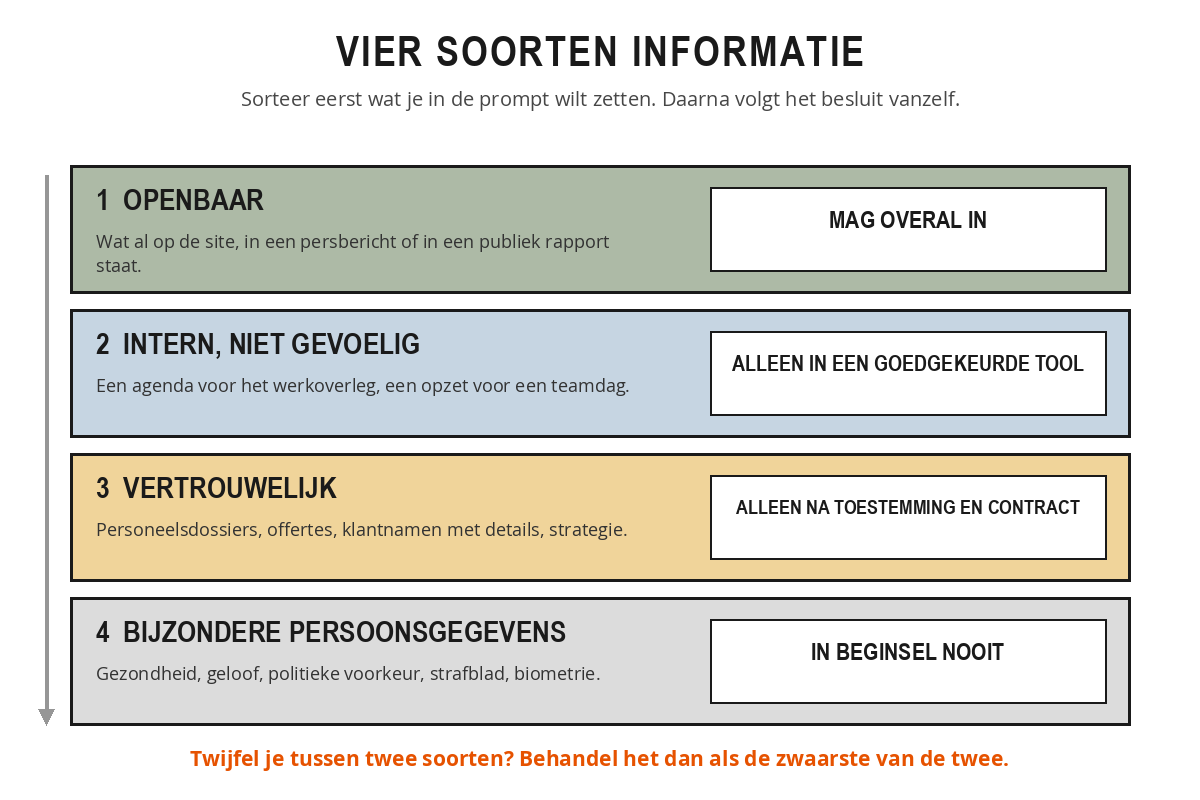
Type 1: public information. Anything that is already out in the open: texts from your own website, a press release, a public annual report, a council document in the public domain. You can put this information into any tool without hesitation, because nothing can leak that has not already leaked. This is by far the largest category that people are needlessly wary about.
Type 2: internal, non-sensitive information. Documents that are not public but contain nothing sensitive: an agenda for a team meeting, an outline for a team away day, a draft text for a manual. This information belongs in a tool that your organisation has approved, not in some random free chat window. The risk is small but not zero, and the agreement exists for a reason.
Type 3: confidential information. Personnel files, salary data, quotations, customer names with details attached, strategy plans, legal documents, medical information. This does not belong in an AI tool, unless your employer has explicitly established that the tool being used is suitable for it and there is a data processing agreement in place with the provider. Without those two things the answer is no, however handy it would be.
Type 4: special category personal data. Data about health, religion, sexual orientation, political preference, criminal records or biometrics. Privacy legislation treats these separately and more strictly than the rest, because misuse of them affects people disproportionately. In principle, such data should never appear in a prompt, not even partly anonymised. If you do want to do something with it, that is not a decision you take at your own desk: it goes through a legal check and a privacy assessment.
Not sure which of two types applies? Then treat it as the more serious of the two. At worst that costs you a detour, whereas the other side of the mistake could earn you a report to the regulator.
At an accountancy firm, assistant accountant Youssef wants to have a difficult letter to a client rewritten. The letter contains the company name, the client number, an outstanding amount of 14,300 euros and the reason the tax return was late. He hesitates: is this type 2 or type 3? It concerns a client, with amounts included, so it is type 3. His firm does have a business tool, but no data processing agreement covering client files. He decides to anonymise the letter first and only then rewrite it. Five minutes of extra work, and he never has to think about it again.
Anonymising as an interim solution
Often it isn't the whole document that is sensitive, but only a few pieces of data in it. A customer's complaint is fine to share, the customer details are not. In that case you anonymise before you put anything in the prompt.
That means: take out names, addresses, dates of birth, file numbers, amounts and other identifiable details. Replace them with something neutral, such as "a customer", "employee A", "[AMOUNT]" or "[DATE]". The assistant does not need that data at all to help you with the structure or the tone of your reply. As soon as you get the text back, you put the real details back in.
Watch out for two things here. First, a combination of individually harmless details can still make someone identifiable: the job title, the department and the start date together sometimes point to just one person. Second, if after anonymising you are left with so little that the question can no longer be answered, then this was not a task for the assistant. That is not a failure, that is the answer.
A passage from a file reads: "Mrs De Vries (customer number 88421, Julianastraat 14, Utrecht) submitted a complaint on 3 October about the failure to refund 1.247 euro." Anonymised, that becomes: "A customer submitted a complaint on [DATE] about the failure to refund [AMOUNT]." The assistant can perfectly well draft an empathetic and clear reply to this, without ever knowing who Mrs De Vries is. Afterwards, the case handler puts the name, date and amount back in and reads the letter through once more.
It isn't only about privacy
When it comes to sensitive information, most people think immediately of personal data, but there is a second category that should just as firmly stay indoors: information that affects your competitive position. A quotation with your margins in it, an acquisition discussion, the set-up of a tender, source code that belongs to you. Privacy law says nothing about this, but you want it sitting with a provider just as little.
And there is something else. What you do with it is also a question. If you have a text written and publish it under your own name, you are the one who stands behind it. If it contains passages that came from somewhere else, that is your problem and not the tool's. That applies to texts and to images.
Take three documents you have worked on in the past week.
- Determine for each document which of the four types applies. Look at the most serious thing it contains, not at the average.
- Find out which AI tool your organisation has approved, and whether a data processing agreement goes with it. Don't know? That is in itself a finding for chapter 4.
- Take the document with the highest type and write down which data you would remove from it to bring it down to a lower type.
- Then check whether the question you had can still be answered without that data.
Summary
- What you type goes to a provider's servers; different rules apply there than at your own office.
- With free consumer versions there is a good chance your input is used for training; with business versions under a contract, usually not.
- Type 1, public information: may go into anything.
- Type 2, internal but non-sensitive information: only in a tool approved by your organisation.
- Type 3, confidential information: only with explicit permission and with a data processing agreement.
- Type 4, special categories of personal data: in principle never, not even partly anonymised.
- If you are not sure which of two types applies, treat it as the more serious of the two.
- Anonymising is the middle way. If you are left with so little that the question no longer works, then it was not a task for the assistant.
- Besides privacy, there is also commercially sensitive information: margins, tenders, code, plans.
You want to have the agenda for the weekly team meeting tidied up. Where does it belong according to the four types?
What is the main difference between a free consumer version and a business version with a contract?
You have anonymised a file, but without the removed data your question can no longer be answered. What does that tell you?