


3. What you do and do not enter
Everything you type into the input field leaves your computer. Where that text then ends up, how long it stays there and who can access it determines whether ChatGPT is usable for your work or in fact a risk. This is the chapter that gives the least pleasure and prevents the most damage.
After this chapter:
- You know what route your input takes and where it is stored.
- You can explain what it means when your conversations are used for training.
- You recognise when something is personal data, even when no name is mentioned.
- You know which data should never go into an input field.
- You make a text ready to paste using six fixed checks.
Where your text goes
Your prompt does not go to a program on your own laptop. It travels via an encrypted connection to the provider's servers, is processed there, and the answer comes back on your screen. That applies to text, but just as much to an attached contract, a photo of a handwritten note or a spoken recording.
Your input stays on those servers. You can see this for yourself in your conversation history. If you delete a conversation, it disappears from your overview, but in the provider's systems it usually remains for a period so that misuse can be detected. Most AI assistants also offer a temporary conversation, which is not saved in your history. That is a useful habit for questions you would rather not see in a list.
There is also the difference between taking part in training or not. If your conversations are used for training, the provider may use them to improve future models. This does not happen literally: no copy of your email is put into the model that someone else can then retrieve. But you do lose control over where that text still circulates, and with confidential work material that is reason enough to switch it off. Where that switch sits differs per provider and per type of subscription; with business subscriptions it is more often already set correctly. Look it up once under the data management settings and then forget about it.
When is something personal data?
Privacy law uses a broader definition than most people have in mind. Besides name, address and citizen service number, it covers any piece of information that can be traced back to a living person. That makes the difference between "this is anonymous" and "this looks anonymous" legally relevant.
Directly identifiable is straightforward: the text contains a name, an email address, a personnel number or a telephone number. Indirectly identifiable is harder, and occurs far more often in prompts. A sentence such as "the only part-time controller at the Zwolle branch who joined last year" contains no name and still points to exactly one person. The law looks at whether identification is reasonably possible, not at whether the name is literally stated.
If you are unsure whether something is personal data, ask this question: could someone who knows the department work out from this who it is about? If the answer is yes, then you treat it as personal data, even if no name appears in it.
What never goes in
A separate group of data receives extra protection, because misuse of it has major consequences: health, ethnic origin, political opinions, religion, trade union membership, sexual orientation, biometrics and criminal data. Absence records, return-to-work reports, discrimination complaints and integrity files almost always fall into this group. For this category the principle is simple: that text does not go into an input field, not even with training turned off.
There is also a common misconception: that the supplier becomes responsible as soon as the data reaches their servers. That is not correct. Your employer is responsible for what employees enter into such a program. The principle that helps you most in practice is called data minimisation: you process no more data than is strictly necessary for your purpose. For a prompt to a language model, that almost always means that most of what you were about to paste is superfluous to the task you are setting.
Els is a team leader and wants to prepare for a difficult conversation. She pastes an employee's entire appraisal report into the input field, including his name, staff number, the remark that he was off sick for six weeks this year and the company doctor's advice. Her question is: "How do I start this conversation?"
For that question she needed exactly three sentences: an employee has failed to meet his commitments for two quarters running, earlier conversations produced promises but no change, and Els wants the conversation to end with an agreement on paper. The name, the number and the sickness absence added nothing to the answer, and the absence and the doctor's advice belong to the category that should not go in at all. Data minimisation is not an extra rule here but simply a better prompt: shorter, sharper and without noise.
Six checks before you paste
Anonymising means editing a text so that no person can be derived from it any longer, not even by someone who knows the situation. That is something other than replacing names with codes: as long as a key or a recognisable context still exists, the risk is reduced but not gone. Six checks make a text ready to paste.
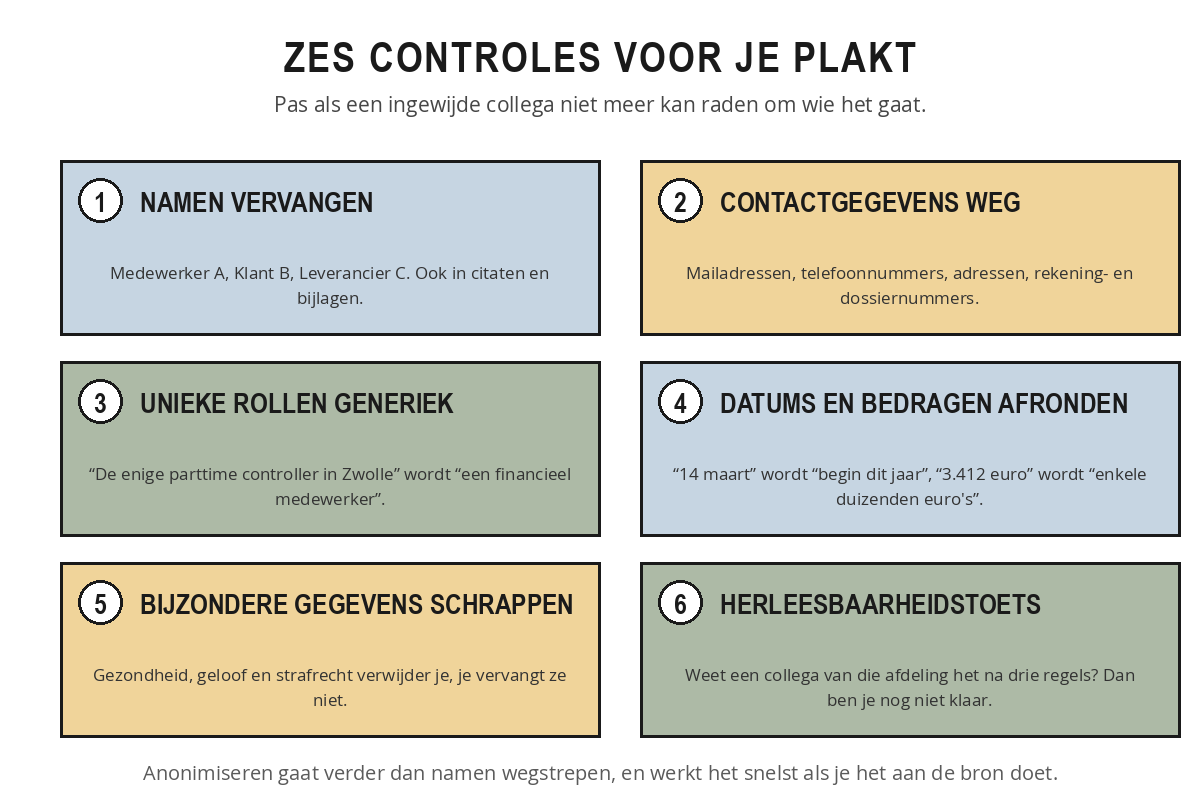
- Replace names. Use Employee A, Customer B and Supplier C consistently, including in quotations and attachments.
- Remove contact details. Email addresses, telephone numbers, home addresses, bank account numbers and case numbers can all go without your task suffering for it.
- Make unique roles generic. 'The only part-time controller in Zwolle' becomes 'a finance employee'.
- Round off dates and amounts. '14 March' becomes 'earlier this year', 'a fine of 3,412 euros' becomes 'a fine of a few thousand euros'.
- Delete special category data. Health, religion and criminal record information should be deleted rather than replaced.
- The re-readability test. Read the text again through the eyes of a colleague from that department. If they know within three lines who it is about, you are not finished yet.
Bram works for a local authority and wants a resident's letter of complaint summarised for his alderman. The letter contains a name, an address, a file number, the date 9 February and the sentence "since my treatment in hospital I can no longer get up the stairs".
After the six checks it reads: "A resident is complaining about an application for a home adaptation that was rejected earlier this year. The resident states that without the adaptation the home is no longer usable and says they called three times without receiving a response." The name, the address and the file number are gone, the date has been rounded off, and the medical information has been deleted rather than replaced. During the traceability check Bram notices that "the application for the stairlift on Bloemstraat" was still there: everyone in his department would have placed that immediately. He changes it to "a home adaptation". His question, how to explain this to an executive in five lines, can be answered just as well with this version.
Anonymising takes less time if you do it at the source. Work with Employee A and Customer B straight away in your own draft, and only put the real names in for the final version you produce yourself. That way you never have to clean up afterwards.
Take three tasks from your own conversation history of the past few weeks and note down for each one:
- What was it about, in one sentence?
- Which direct personal data did it contain?
- Which combination of data points to one person, even without a name?
- Was there anything from the category that should never go in?
- Was this acceptable, questionable or unwise?
Then choose the prompt with the highest risk and rewrite it without those details. Check whether the answer you were looking for would still come out.
Summary
- Everything you enter goes to the provider's servers and stays there for a while.
- A temporary chat shortens the retention period; the training toggle is something you look up once.
- Personal data is any data that points directly or indirectly to a living person.
- Indirect identifiability is the most common: a unique role or situation points to one person even without a name.
- Health, ethnic origin, religion, trade union membership, sexual orientation, biometrics and criminal records do not go in.
- Your employer is responsible for what you enter, not the supplier.
- Six checks: replace names, remove contact details, make unique roles generic, round off dates and amounts, delete special category data, and the traceability check.
Your text says: 'the only part-time controller at the Zwolle branch who joined last year'. How do you assess that?
What do you do with health data in a text you want summarised?
Who is responsible for the personal data an employee types into an AI chat?